
UNIAPP手写签名
前言
在项目开发过程中遇到需要签名的地方,就做了一个签名组件
签名组件
<template>
  <view v-if="modelValue" class="lee-signature" @touchmove.prevent>
    <view class="lee-signature__box">
      <view class="lee-signature__opreate">
        <button @click="close" class="lee-signature__opreate--back">返回</button>
        <button @click="clearSignature" class="lee-signature__opreate--fresh">重写</button>
        <button @click="saveSignature" class="lee-signature__opreate--finish primary">完成</button>
      </view>
      <canvas
        canvas-id="signatureCanvas"
        class="signature-canvas lee-signature__canvas"
        @touchstart="handleTouchStart"
        @touchmove="handleTouchMove"
        @touchend="handleTouchEnd">
      </canvas>
      <view class="lee-signature__opreate--title">请在下方签名</view>
    </view>
  </view>
</template>

<script setup>
import { ref, watch, nextTick } from 'vue'

const ctx = ref(null)
const points = ref([])
const isDrawing = ref(false)
const canvasWidth = ref(0)
const canvasHeight = ref(0)
const isEmpty = ref(true)

const props = defineProps({
  modelValue: {
    type: Boolean,
    default: false
  }
});
const emit = defineEmits(['update:modelValue', 'success']);

const close = () => {
  emit('update:modelValue', false);
};

watch(() => props.modelValue, (newVal) => {
  if (newVal) {
    nextTick(() => {
      initCanvas()
      getCanvasSize()
    })
  } else {
    // 清空画布
    clearSignature()
  }
})

const initCanvas = () => {
  ctx.value = uni.createCanvasContext('signatureCanvas', this)

  // 设置画布样式
  ctx.value.setStrokeStyle('#000000')
  ctx.value.setLineWidth(4)
  ctx.value.setLineCap('round')
  ctx.value.setLineJoin('round')

  // 初始填充白色背景
  ctx.value.setFillStyle('#ffffff')
  ctx.value.fillRect(0, 0, canvasWidth.value, canvasHeight.value)
  ctx.value.draw(true)
}

// 获取画布实际尺寸
const getCanvasSize = () => {
  uni.createSelectorQuery()
    .select('.signature-canvas')
    .boundingClientRect(res => {
      if (res) {

        canvasWidth.value = res.width
        canvasHeight.value = res.height
        console.log(canvasHeight.value, canvasWidth.value, "ssssssssssssssssssss")
        // 初始填充白色背景
        ctx.value.setFillStyle('#ffffff')
        ctx.value.fillRect(0, 0, canvasWidth.value, canvasHeight.value)
        ctx.value.draw(true)

        // 设置canvas的实际绘制尺寸(解决高清屏模糊问题)
        // const pixelRatio = uni.getSystemInfoSync().pixelRatio
        // const canvas = document.querySelector('.signature-canvas')
        // if (canvas) {
        //   canvas.width = res.width * pixelRatio
        //   canvas.height = res.height * pixelRatio
        //   ctx.value.scale(pixelRatio, pixelRatio)
        // }
      }
    })
    .exec()
}

const handleTouchStart = (e) => {
  isDrawing.value = true
  const point = {
    x: e.touches[0].x,
    y: e.touches[0].y
  }
  points.value = [point]

  // 开始路径
  ctx.value.beginPath()
  ctx.value.moveTo(point.x, point.y)
}

const handleTouchMove = (e) => {
  if (!isDrawing.value) return

  const point = {
    x: e.touches[0].x,
    y: e.touches[0].y
  }
  points.value.push(point)

  if (points.value.length >= 2) {
    isEmpty.value = false
    ctx.value.moveTo(points.value[points.value.length - 2].x, points.value[points.value.length - 2].y)
    ctx.value.lineTo(point.x, point.y)
    ctx.value.stroke()
    ctx.value.draw(true)
  }
}

const handleTouchEnd = () => {
  isDrawing.value = false
  points.value = []
}
// 清除签名内容
const clearSignature = () => {
  ctx.value.clearRect(0, 0, canvasWidth.value, canvasHeight.value)
  ctx.value.setFillStyle('#ffffff')
  ctx.value.draw(true)
  isEmpty.value = true
}
// 完成签名
const saveSignature = () => {
  if (isEmpty.value) {
    return uni.showToast({title: '请签名', icon: 'none'})
  }
  uni.canvasToTempFilePath({
    canvasId: 'signatureCanvas',
    success: (res) => {
      emit('success', res.tempFilePath)
      close()
    },
    fail: (err) => {
      console.error('生成图片失败:', err)
    }
  })
}
</script>

<style lang="scss" scoped>
.lee-signature {
  position: fixed;
  top: 0;
  left: 0;
  right: 0;
  bottom: 0;
  width: 100%;
  height: 100%;
  z-index: 9999; /* 确保在最上层 */
  background-color: $uni-bg-color-grey;
  &__box {
    box-sizing: border-box;
    position: relative;
    height: 100%;
    display: flex;
    align-items: center;
    padding: 20rpx 0 20rpx 50px;
    overflow: hidden;
  }
  &__canvas {
    width: 600rpx;
    height: 100%;
    background-color: #fff;
    border-radius: 8rpx;
    box-shadow: 0 2rpx 10rpx rgba(0, 0, 0, 0.1);
  }
  &__opreate {
    &--title {
      width: 100px;
      height: 30px;
      transform: rotate(90deg) translateY(-34px);
      transform-origin: center;
      position: absolute;
      right: 0;
    }
    &--back {
      position: absolute;
      top: 0;
      left: 0;
      width: 80px;
      height: 36px;
      line-height: 36px;
      transform: rotate(90deg) translateY(15px) translateX(34px);
      font-size: 28rpx;
      border-radius: 8rpx;
      background-color: #f0f0f0;
      color: #333;
      border: none;
    }
    &--fresh {
      position: absolute;
      top: 0;
      left: 0;
      width: 80px;
      height: 36px;
      line-height: 36px;
      transform: rotate(90deg) translateY(15px) translateX(120px);
      font-size: 28rpx;
      border-radius: 8rpx;
      background-color: #f0f0f0;
      color: #333;
      border: none;
    }
    &--finish {
      position: absolute;
      left: 0;
      bottom: 0;
      width: 120px;
      height: 36px;
      line-height: 36px;
      transform: rotate(90deg) translateY(36px) translateX(-53px);
      font-size: 28rpx;
      border-radius: 8rpx;
      background-color: #f0f0f0;
      color: #333;
      border: none;
    }
  }
}
.primary {
  background-color: #007aff;
  color: #fff;
}
</style>
使用签名组件
<template>
  <view class="signature">
    <button class="signature-button" @click="openSignature">点击签名</button>
    <image class="signature-image" v-if="signatureUrl" :src="signatureUrl"></image>
    <lee-signature v-model="showSignature" @success="getSignatureUrl"></lee-signature>
  </view>
</template>

<script setup>
import { ref } from 'vue';


const showSignature = ref(false)
const signatureUrl = ref('')
const openSignature = () => {
  showSignature.value = true
}
// 获取签名图片地址
const getSignatureUrl = (image) => {
  signatureUrl.value = image
}
</script>

<style lang="scss" scoped>
.signature {
  padding: 30rpx;
  display: flex;
  align-items: center;
  justify-content: center;
  flex-direction: column;
}
.signature-button {
  width: 260rpx;
  height: 70rpx;
  display: flex;
  align-items: center;
  justify-content: center;
  color: #fff;
  background: $uni-color-primary;
}
.signature-image {
  box-sizing: border-box;
  margin-top: 30rpx;
  width: 344rpx;
  height: 909rpx;
}
</style>
效果展示
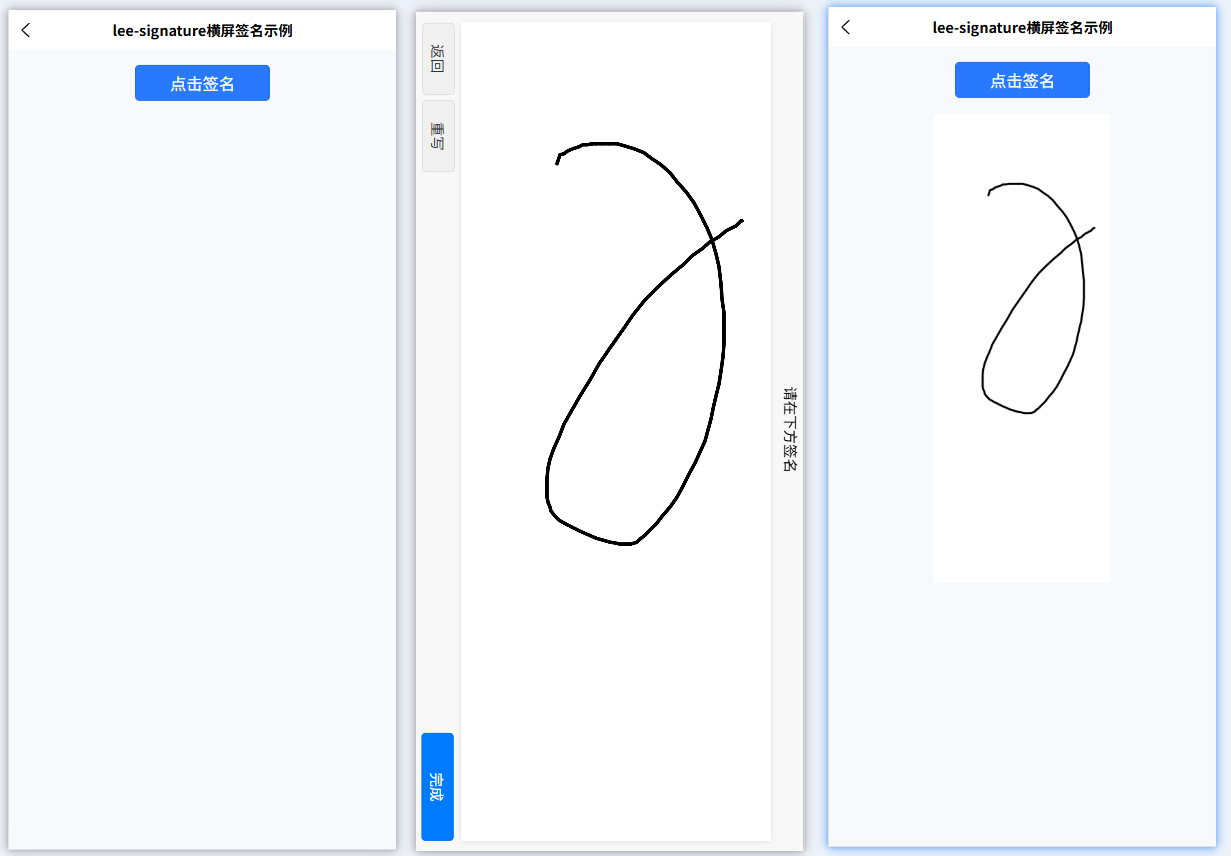
使用时需要注意的地方
- 由于签名是横版签的,所以在页面展示时需要旋转一下