UNIAPP中的两种swiper效果
前言
最近在做C端小程序,公司需要在用户体验上像大品牌的小程序靠齐,就整了一些好看的设计,背景虚化的轮播图,双层轮播图等。
背景虚化轮播图
一个高斯模糊的背景图片和一个轮播图固定在一起,当轮播图切换时,同时切换背景图。
<template>
  <view class="swiper-blur">
    <view class="swiper-blur__bg">
      <image class="swiper-blur__bg--image" :src="bgImage" alt="" />
    </view>
    <swiper class="swiper-blur__swiper"
      :autoplay="true"
      :circular="true"
      :interval="3000"
      :duration="500"
      :current="swiperIndex"
      @change="changeSwiper"
    >
      <swiper-item class="swiper-blur__swiper--item" v-for="(item, index) in swiperList" :key="index">
        <view class="swiper-blur__swiper--image">
          <image :src="item.image"></image>
        </view>
      </swiper-item>
    </swiper>
  </view>
</template>

<script setup>
import { computed, ref } from 'vue';
const swiperIndex = ref(0)
const swiperList = ref([
  {
    image: '/static/images/components/lee-swiper-blur/swiper1.png'
  },
  {
    image: '/static/images/components/lee-swiper-blur/swiper2.png'
  }
])

const bgImage = computed(() => {
  return swiperList.value[swiperIndex.value].image
})

const changeSwiper = (e) => {
  swiperIndex.value = e.detail.current
}

</script>

<style lang="scss" scoped>
.swiper-blur {
  height: 400rpx;
  width: 750rpx;
  position: relative;
  &__bg {
    position: absolute;
    height: 400rpx;
    width: 750rpx;
    top: 0;
    /* #ifdef MP || APP-PLUS */
    z-index: -1;
    /* #endif */
    /* #ifdef H5 */
    z-index: 0;
    /* #endif */
    filter: blur(0);
    overflow: hidden;
    &--image {
      height: 400rpx;
      width: 750rpx;
      filter: blur(10rpx);
    }
  }
  &__swiper {
		height: 315rpx;
		width: 675rpx;
		position: absolute;
		top: 50%;
		left: 50%;
		transform: translate(-50%, -50%);
		z-index: 100;
		&--image {
			height: 315rpx;
			width: 675rpx;
			image {
				height: 315rpx;
			  width: 675rpx;
        border-radius: 8rpx;
			}
		}
  }
}
</style>

(图片来源网络)
双层轮播图
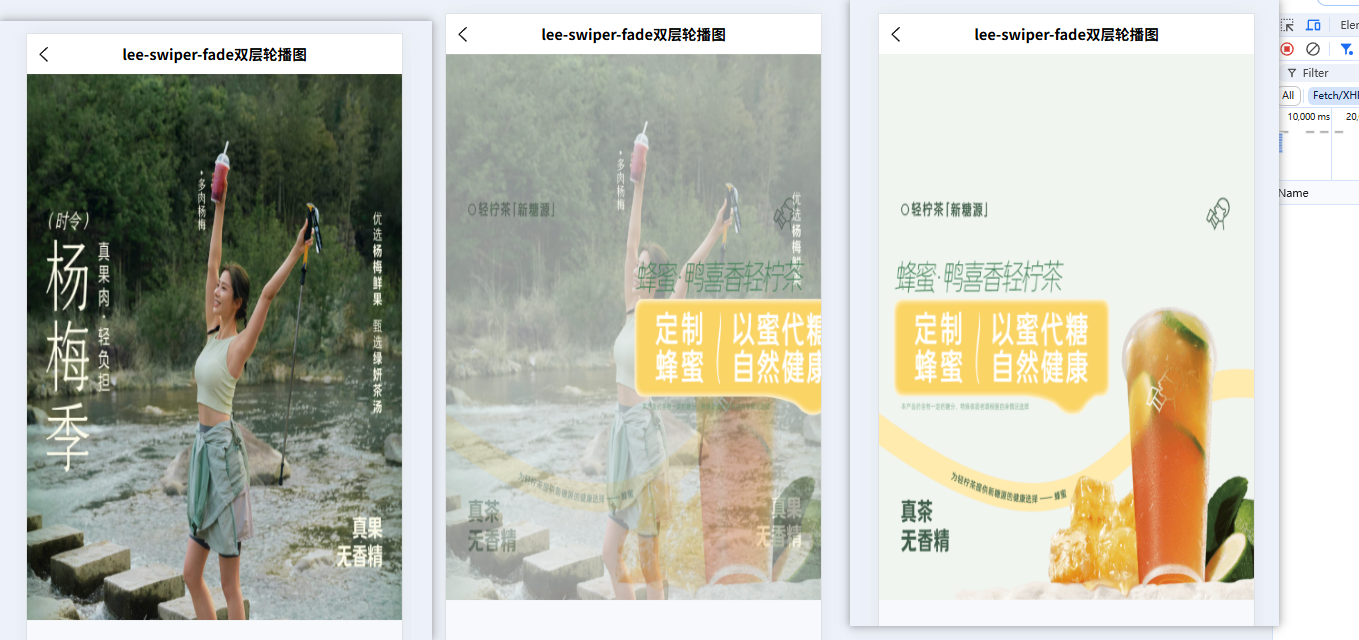
双层轮播图是将普通轮播图上的描述文字和产品底图拆分成两份图片。描述文字层展示文字内容,并且图片是透明的;产品底图就是去掉文字的图片。
工作原理:文字图片设置成轮播,底图通过轮播切换时,去切换底图,可以做两张渐变的效果,也可以一张直接切换。两张渐变效果:根据轮播滚动的距离,将当前轮播的底图透明度渐渐降低,将轮播滚动的下一张图片底图透明度一直增加。
<template>
  <view class="swiper-fade">
    <view class="swiper-fade__bg">
      <!-- <lee-transition :show="!!opacityImageSrc" type="fade" :duration="1000"> -->
        <image image class="swiper-fade__bg--pos" :src="opacityImageSrc" :style="{'opacity': swiperOpacity}"></image>
      <!-- </lee-transition> -->
      <image class="swiper-fade__bg--image" :src="bgImageSrc" :style="{'opacity': bgOpacity}"></image>
    </view>
    <swiper class="swiper-fade__swiper"
      :autoplay="true"
      :circular="true"
      :interval="5000"
      :duration="1500"
      :current="swiperIndex"
      @transition="transitionSwiper($event)"
      @animationfinish="finishSwiper"
      @touchstart="handleTouchStart"
    >
      <swiper-item class="swiper-fade__swiper--item" v-for="(item, index) in list" :key="index">
        <view class="swiper-fade__swiper--image">
          <image :src="item.textImg"></image>
        </view>
      </swiper-item>
    </swiper>
  </view>
</template>

<script setup>
import { computed, ref, watch } from 'vue';

const props = defineProps({
  list: {
    type: Array,
    default() {
      return [
        {
          textImg: "https://go.cdn.heytea.com/storage/product/2022/12/19/7e350accacfe49b29928f18a155e3abf.jpg",
          underImg: "https://go.cdn.heytea.com/storage/product/2023/05/25/8e0c39cc9ac74a2894a150fac38e9b97.jpg-app"
        }, {
          textImg: "https://go.cdn.heytea.com/storage/product/2024/06/01/258d94733aa849b58fbef417a8426434.jpg",
          underImg: "https://go.cdn.heytea.com/storage/product/2024/06/01/08a5ce539d8b491a927dddd536a9d6cf.jpg-app"
        }, {
          textImg: "https://go.cdn.heytea.com/storage/product/2024/05/10/09eaca1bf69a4671a8502b9d7c8a0057.jpg",
          underImg: "https://go.cdn.heytea.com/storage/product/2024/04/21/1dab4495f3354340b51499590aeffddb.jpg-app"
        }, {
          textImg: "https://go.cdn.heytea.com/storage/product/2024/06/10/ba63ce2a3d0e43cc8f5173810c335986.jpg",
          underImg: "https://go.cdn.heytea.com/storage/product/2024/06/10/e1bc5d44ea4b40be847b3828fafa260b.jpg-app"
        }, {
          textImg: "https://go.cdn.heytea.com/storage/product/2024/05/28/07206a78c5864d0abb0b61372c6fb082.jpg",
          underImg: "https://go.cdn.heytea.com/storage/product/2024/05/28/fc8a061479f54c6484246523b18d01b5.jpg-app"
        }
      ]
    }
  }
})
const isTouch = ref(false)
const handleTouchStart = () => {
  isTouch.value = true
}

const moveDx = ref(0)
const opacityImageSrc = ref('')
// swiper-item 的位置发生改变时会触发 transition 事件,
const transitionSwiper = (e) => {
  swiperOpacity.value = 0
  moveDx.value = Math.abs(Math.floor(e.detail.dx)) // 计算移动距离的绝对值,用来计算透明度
  let computedSwiperIndex = e.detail.dx > 0 ? 1: -1 // 1是顺序往后划,-1是顺序往前划
  let opacityIndex = swiperIndex.value + computedSwiperIndex
  if (computedSwiperIndex == -1 && isTouch.value == false) {
    opacityIndex = 0
  }
  if (opacityIndex >= props.list.length) {
    opacityIndex = 0
  }
  if (opacityIndex < 0) {
    opacityIndex = props.list.length - 1
  }
  let image = props.list.filter((item, index) => index == opacityIndex)
  opacityImageSrc.value = image[0].underImg
  computeOpacity()
}

const swiperIndex = ref(0)
// 动画结束时会触发 animationfinish 事件
const finishSwiper = (e) => {
  bgOpacity.value = 1
  swiperOpacity.value  = 0
  opacityImageSrc.value = ''
  swiperIndex.value = e.detail.current
  isTouch.value = false
}


// 获取背景图的图片地址
const bgImageSrc = computed(() => {
  let image = props.list.filter((item, index) => index == swiperIndex.value)
  return image[0].underImg
})

const screenWidth = 375
const bgOpacity = ref(1)
const swiperOpacity = ref(0)
// 计算两个图片的透明度
const computeOpacity = () => {
  let swiperOp = (moveDx.value / screenWidth) > 1 ? 1 : moveDx.value / screenWidth
  swiperOpacity.value = parseFloat(swiperOp.toFixed(2))
  let bgOp = (Math.abs(screenWidth - moveDx.value) / screenWidth) <= 0 ? 0 : (Math.abs(screenWidth - moveDx.value) / screenWidth)
  bgOpacity.value = parseFloat(bgOp.toFixed(2))
}

</script>

<style lang="scss" scoped>
.swiper-fade {
  height: 600px;
  width: 750rpx;
  position: relative;
  &__bg {
    position: absolute;
    height: 600px;
    width: 750rpx;

    &--pos {
      position: absolute;
      height: 600px;
      width: 750rpx;
      top: 0;
      left: 0;
      z-index: 100;
      transform: translate(0%, 0) translateZ(0);
	    transition: 1s;
    }
    &--image {
      position: absolute;
      height: 600px;
      width: 750rpx;
      top: 0;
      left: 0;
      z-index: 9999;
      transform: translate(0%, 0) translateZ(0);
	    transition: 1s;
    }

  }
  &__swiper {
    position: absolute;
    z-index: 99999;
    height: 600px;
    width: 750rpx;
    &--image {
      height: 600px;
      width: 750rpx;
      image {
        width: 100%;
        height: 100%;
      }
    }
  }
}
</style>